 Ozmium Docs
Wallets and Base
How to get a wallet on Base mainnet, which wallet types Ozmium supports, and what EIP-5792 smart wallets change about approvals and gas sponsorship.
Ozmium is self-custodial, and it never creates, stores, or accesses a key on your behalf. You do not need one to browse the app - see Quickstart for what preview mode shows - but you do need one to transact. If you do not have a wallet on Base yet, this page gets you one.
Why Base Only
Base is an Ethereum layer-2 network, chain id 8453, incubated by Coinbase and secured by Ethereum. Ozmium is a web interface built around the Base ecosystem. It is not itself a smart contract and does not live on the chain. It reads Base state and constructs transactions that your wallet signs.
Deploying against a single network is deliberate.
One verifiable address set. Every contract Ozmium can reach is a single Base mainnet address, listed in Security And Trust. No chain-switching, no risk of signing on the wrong network.
No bridge dependency. Cross-chain bridges have been the largest single category of loss in this industry. Ronin, Wormhole, Nomad, and Harmony together account for well over a billion dollars in bridge exploits. Ozmium does not operate a bridge, does not route through one, and does not ask you to trust one.
Costs that make active management sensible. Gas on Base is low enough that modest positions and frequent adjustment remain economically rational, rather than being priced out by settlement costs. That is the point of the network, and Base states it plainly:
Moving Funds to Base
If your assets sit on Ethereum mainnet or elsewhere, three routes:
| Route | Use When |
|---|---|
| Base Bridge | Assets Are on Ethereum Mainnet |
| Exchange Withdrawal | Your exchange supports Base withdrawals directly. Usually cheapest |
| In-app Deposit | Buying with card, Apple Pay, or bank. See Transfers |
Once funds are on Base, you can acquire OZ in a single swap, either in the app or directly on Uniswap. The OZ/USDC pool on Aerodrome is the other venue. See OZ Token for what holding it does.
Getting an Account
The sign-in panel offers three routes:
- Sign In With Base. You already have a Base account, whether through the browser extension, the Base App, or the email and passkey it was created with. The Base SDK window handles all three.
- Create a Base Account. A brand new wallet from an email and a passkey, made right there in the app. No seed phrase to write down and lose.
- Mini-apps and more ways in. An injected wallet you already run, or Ozmium opened inside the Base App or Farcaster, where the host wallet is already connected.
Both Base options open the same SDK window, which offers sign-in and account creation together.
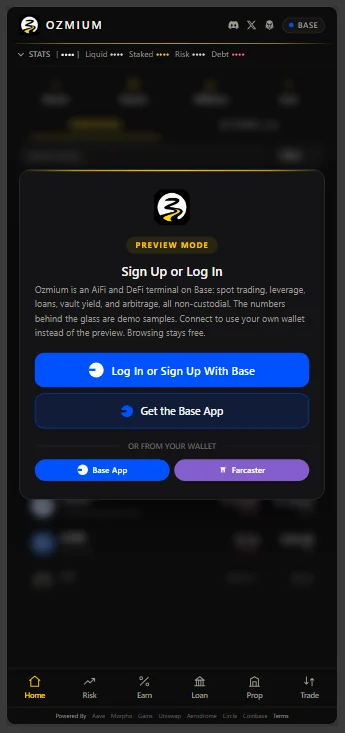
Starting from scratch? Create a Base account through Ozmium. Signing up through that link enrolls you in whatever incentive programs Base is running at the time, such as rebates, and a fee discount applies regardless. Base App also pays rewards on idle USDC held in the wallet.
Adding Base to an Existing Wallet
Most wallets detect Base automatically. If yours needs it entered manually:
| Field | Value |
|---|---|
| Network Name | Base |
| RPC URL | https://mainnet.base.org |
| Chain ID | 8453 |
| Currency Symbol | ETH |
| Block Explorer | https://basescan.org |
To add OZ as a token in your wallet:
| Field | Value |
|---|---|
| Contract Address | 0x148313dcdb7a7111ebefa4871f6a7fef34833b07 |
| Symbol | OZ |
| Decimals | 18 |
Once Base is selected, connect and you are done.
Supported Wallet Types
| Type | What It Is | Notes |
|---|---|---|
| Injected EIP-1193 | Standard Browser Extension Wallets | The classic path. One confirmation per action. |
| EIP-5792 Smart Wallet | Smart Contract Account with Batching | Approve and act in a single confirmation; actions can be gas-sponsored. |
| Base Account | Coinbase's Base-native Account | Passkey based, no seed phrase to lose. |
| Base App / Farcaster Host | Mini-app Environment | The host wallet is already connected when Ozmium opens inside it. |
What Smart Wallets Change
On an EIP-5792 smart wallet, Ozmium batches the ERC-20 approve and the action itself into one confirmation. Practically:
- Fewer signatures. A leveraged open that used to be approve-then-open is one tap.
- Fewer stuck states. You cannot end up approved-but-not-executed because the batch either lands or reverts as a unit.
- Gas can be sponsored by the host, so a first-time user without ETH is not immediately blocked.
On an injected wallet you will see the individual steps instead. Nothing is lost, it is just more confirmations.
Passkeys and Your Data
If you sign in with a passkey, the key pair lives on your own device under your control. Ozmium never sees it, and deleting the passkey from your device removes it from Ozmium as well.
Ozmium does not collect, store, sell, or share personal information, and runs no advertising or behavioral tracking. There is no account to create and no profile behind it. The full data statement is in Terms And Risk.
The Underlying Networks
Everything below is operated by someone other than Ozmium, and every one of them is worth reading directly.


Security Habits Worth Having
- Keep a spending wallet separate from a holding wallet. The wallet you connect to any dApp should not be the wallet holding everything you own.
- Review approvals. An unlimited ERC-20 approval persists until revoked. Revoke ones you no longer use.
- Verify addresses against a second source. Contract addresses are listed in Security And Trust and on the app's own Terms sheet. Cross-check them against each protocol's official documentation before signing something large.
- Never share a seed phrase. Ozmium will never ask for one. Nothing legitimate ever will.